# Mac and browser
> The planning machine – week in the hour grid, sidebar expanded and collapsed, areas with list and side column. Applies to a Mac app and to the web app in the browser, with measurements in points and keyboard shortcuts.
Source: https://brand.heyalbert.family/en/mac/ · Hey Albert brand and design system
At the Mac you sit down. Density is allowed here: the whole week at once, tables, columns, keyboard. The Mac is the only place where safe, vault and finances open fully.
## Mac app and web app
There are two ways onto a large screen, and both share **the same layout**:
- **The Mac app** from `apps/apple` (SwiftUI, one target next to iPhone and iPad). Only it can do what needs native code: Face ID for the vault, Secure Enclave, notifications, shortcuts.
- **The web app** at app.hey-albert.app (Next.js, `apps/web`) for any browser, including computers without the App Store. The web app is the surface for planning and paperwork. The vault is not here, because the browser has no Secure Enclave.
Sidebar, header, greeting, grid and cards are the same components. Whoever designs a surface for the Mac designs it for both.
> **Open**
>
> The Mac app is not in the repository yet. The app moves from its predecessor into `apps/apple` in phase 0 (`docs/12-roadmap.md`). Today the web app shows the Today surface and the HQ.
## Window and measurements
The reference screens are drawn for a **1440 × 900 pt** window. `docs/12-roadmap.md` also names 1600 × 1000 pt. The window is freely resizable. Below 1200 pt width the sidebar collapses (proposal).
| Measure | Value | Token |
|---|---|---|
| Sidebar | 220 pt, collapsed 72 pt, 24 pt from the window edge | `--leiste-mac`, `--leiste-mac-eng`, `--radius-block` |
| Gap between sidebar and surface | 32 pt | `--flaeche-rand-mac` |
| Header | search pill 46 pt, circles 40 pt | – |
| Greeting | 40 pt | `--grad-anrede-mac` |
| Day tabs | 68 pt high, radius 12 pt | `--radius-klein` |
| Cards | padding 12 pt, radius 16 pt | `--karte-innen`, `--radius-karte` |
| Target size | 28 pt for the pointer | `--ziel-zeiger` |
| Places in the sidebar | 42 pt high | – |
## Week in the hour grid
The hero view. Seven columns, an hour grid, the now line. This is where the week is shared out.
**Mac · Week in the hour grid** · 1440 × 900 pt · established
| Nr. | Region | Frame (x, y, w, h in pt) | Measure | Tokens | Components | What goes there |
| --- | --- | --- | --- | --- | --- | --- |
| 1 | Sidebar | 24, 24, 220, 852 | 220 pt, 24 pt from the window edge | --leiste-mac, --radius-block, --flaeche-leiste, --akzent | LeisteMac | Black block: wordmark „Hey Albert“, then surfaces (Today, Week, Inbox with counter), areas (Food, Tasks, School, Joy, Important), personal (Me, Household), and at the bottom the person with „Profil und Einstellungen“. Active place: pink stroke on the left. Albert is not a place. |
| 2 | Surface header | 276, 32, 1132, 48 | search pill 46 pt, circles 40 pt | --flaeche-erhoben, --akzent, --schwarz, --flaeche-rand-mac | Kopfzeile | Search pill with pink magnifier. Inside on the right „In:“ and dashed area chips: events, drives, tasks, documents, mail with counter. Then three circles in fixed order: bell, messages, pink plus. |
| 3 | Greeting | 276, 104, 700, 48 | 40 pt | --grad-anrede-mac, --laufweite-titel | Anredezeile | „Guten Morgen, Anna.“ in Bricolage 800, tight tracking. In the week board one line below: „Mittwoch, 3. September · 16:40 · zwei Sachen offen, ein Vorschlag“. |
| 4 | Date and people | 276, 166, 420, 34 | | --schwarz, --person-1, --person-2, --person-3, --person-4, --person-5 | DatumPille, PersonenFilter | Black date pill „1. – 7. September“, next to it the person filter: everyone, then A, T, F, L, S. |
| 5 | Span control | 1010, 166, 398, 34 | | --knopf-zweit, --schwarz | SpannenRegler | Today · 3 days · Mon – Fri · Mon – Sun · Month, right-aligned. |
| 6 | Week number and day tabs | 276, 222, 1132, 68 | tabs 68 pt, radius 12 pt | --radius-klein, --grad-kapitaelchen, --schwarz, --sonntag | Tagesreiter | „KW 36“ on the left. Seven tabs with weekday in small caps and date „3.9.“. Today black, Sunday pink-grey. |
| 7 | Time axis | 276, 300, 52, 600 | | --schrift-mono, --ziffern-tabellarisch, --grad-zweit | Zeitachse | Times HH:MM in Roboto Mono, every half hour. The current time is a pink pill: „16:40“. |
| 8 | Hour grid with cards | 344, 300, 1064, 600 | | --karte-innen, --radius-karte, --bedeutung-fahrt, --bedeutung-familie, --rand-vorschlag, --rand-offen | Zeitachse, Karte, BuendelKarte, KonfliktKarte | One column per day. The axis only sets the start; a card grows as tall as its content needs. Drives blue, family yellow, events beige, Albert dashed grey without fill and with two buttons, open items dashed pink. |
| 9 | Now line | 276, 616, 1132, 16 | | --linie-jetzt, --muster-gestrichelt | JetztLinie | Dashed across the full width, catches no clicks. Pink means now here, never error. |
| 10 | Quick menu (open) | 1182, 86, 226, 256 | | --flaeche-erhoben, --radius-karte | SchnellMenue | Sits over the grid while the pink plus is pressed: event (⌘ N), task, drive, scan document, contact, note. Nouns, not verbs. |
## Sidebar collapsed
Collapsed, the sidebar stays 72 pt wide. All the width gained goes to the columns.
**Mac · Sidebar collapsed** · 1440 × 900 pt · established
| Nr. | Region | Frame (x, y, w, h in pt) | Measure | Tokens | Components | What goes there |
| --- | --- | --- | --- | --- | --- | --- |
| 1 | Collapsed sidebar | 24, 24, 72, 852 | 72 pt | --leiste-mac-eng, --radius-block | LeisteMac | The ball in a cream circle at the top, then icons only, separated into three groups by hairlines. The pink arrow on the edge expands it again. Your own circle at the bottom. |
| 2 | Surface header | 128, 32, 1280, 48 | | | Kopfzeile | As expanded, only wider. |
| 3 | Greeting | 128, 104, 700, 48 | | --grad-anrede-mac | Anredezeile | „Guten Morgen, Anna.“ |
| 4 | Primary action | 1218, 106, 190, 42 | | --knopf-primaer-flaeche, --ziel-zeiger | Knopf | „Neuer Termin“ (new event) as a black button, next to it the circle for view settings. One goal per surface. |
| 5 | Date, people, span | 128, 166, 1280, 34 | | | DatumPille, PersonenFilter, SpannenRegler | One row, span on the right. |
| 6 | Week number and day tabs | 128, 222, 1280, 68 | | | Tagesreiter | Seven tabs, wider than expanded. |
| 7 | Time axis and grid | 128, 300, 1280, 600 | | | Zeitachse, Karte, JetztLinie | The 148 pt gained go entirely to the seven columns. |
### LeisteMac
Source: `packages/design-system/components/leiste/LeisteMac.jsx`
Die schwarze Leiste des Mac – Logo, drei Gruppen, unten der Mensch.
```jsx
```
Der aktive Ort trägt einen rosa Strich links und ein aufgehelltes Feld. Eingeklappt als `fassung="pille"` tritt er als rosa Kreis seitlich heraus und die Leiste beult sich um ihn. Albert steht nicht in der Leiste – er ist kein Ort.
Das Logo lädt aus `assets/logo-albert-hell.png`; setze auf `` `data-albert-logo=""`, wenn es woanders liegt.
```ts
/**
* Die schwarze Leiste auf dem Mac - voll (220 px) oder eingeklappt (72 px) als Block oder als Pille.
*/
export interface LeisteOrt { name: string; zeichen: string; zaehler?: number }
export interface LeisteGruppe { gruppe: string; eintraege: LeisteOrt[] }
export interface LeisteMacProps {
/** Der Ort, auf dem man steht: "Heute" | "Woche" | "Eingang" | "Essen" | ... */
aktiverOrt?: string;
/** Gruppen der Navigation. Standard: Flächen, Bereiche, Persönlich. */
orte?: LeisteGruppe[];
eingeklappt?: boolean;
/** Eingeklappt gibt es zwei Fassungen: schmaler "block" oder rundum abgerundete "pille",
* bei der der aktive Ort als rosa Kreis seitlich heraustritt. */
fassung?: "block" | "pille";
/** Der Mensch unten in der Leiste. */
ich?: string;
onWahl?: (ort: string) => void;
onKlappen?: () => void;
onProfil?: () => void;
style?: React.CSSProperties;
}
export function LeisteMac(props: LeisteMacProps): JSX.Element;
export const ORTE: LeisteGruppe[];
```
## Areas with list and side column
Tasks, Important, Joy and Household follow one pattern: title with a count line, open items at the top, a table, a side column on the right.
**Mac · Area with list and side column** · 1440 × 900 pt · established
| Nr. | Region | Frame (x, y, w, h in pt) | Measure | Tokens | Components | What goes there |
| --- | --- | --- | --- | --- | --- | --- |
| 1 | Sidebar | 24, 24, 220, 852 | | | LeisteMac | The active area carries the pink stroke. |
| 2 | Header with area chips | 268, 24, 1148, 46 | | | Kopfzeile | The chips belong to the area: in tasks „Alle, Offen, Kinder, Haushalt“, in the safe „Verträge, Ausweise, Bescheide, Fristen“. |
| 3 | Title and count line | 268, 88, 700, 64 | | --grad-anrede-mac, --grad-zweit | Anredezeile | „Aufgaben“, below it „Diese Woche · 18 Aufgaben · 2 ohne Zuständigen“. The count line always names what is open. |
| 4 | Primary action or number tiles | 996, 88, 420, 100 | | | Knopf, ZahlKachel | Top right either a black button („Aufgabe anlegen“, „Menschen einladen“) or two number tiles („3 Fristen in den nächsten 90 Tagen“). |
| 5 | Open, no one responsible | 268, 196, 786, 156 | | --rand-offen | Karte | At the very top, dashed pink outline: „der einzige Ort, an dem eine Aufgabe ohne Namen liegen darf“ (the only place a task may sit without a name). Each row carries „Noch niemand“ (no one yet). |
| 6 | Table | 268, 372, 786, 356 | | --hell, --linie-haar, --grad-kapitaelchen | Avatar, ZustandsPille, Knopf | Header in small caps, rows separated by hairlines, state or action per row on the right. Density is allowed on the Mac. |
| 7 | Side column | 1076, 196, 340, 306 | | --bedeutung-familie, --schwarz | Karte, TalerStand | What belongs to the area but not in the list: Sunday round, this week’s Taler, the vault as a black card with „Mit Face ID öffnen“. |
| 8 | Notes at the bottom | 268, 740, 1148, 60 | | --flaeche-karte | | In the clerk register, what applies: „Was wer sehen darf, entscheidet die Datenbank, nicht ein ausgeblendeter Knopf.“ |
## The Sunday round
The Sunday round is a surface of its own without a sidebar. Eight guided steps, large type for the family circle, one person’s turn at a time. The round runs from the Mac or iPad to the TV via AirPlay. The screen is drawn for 1920 × 1080 pt.
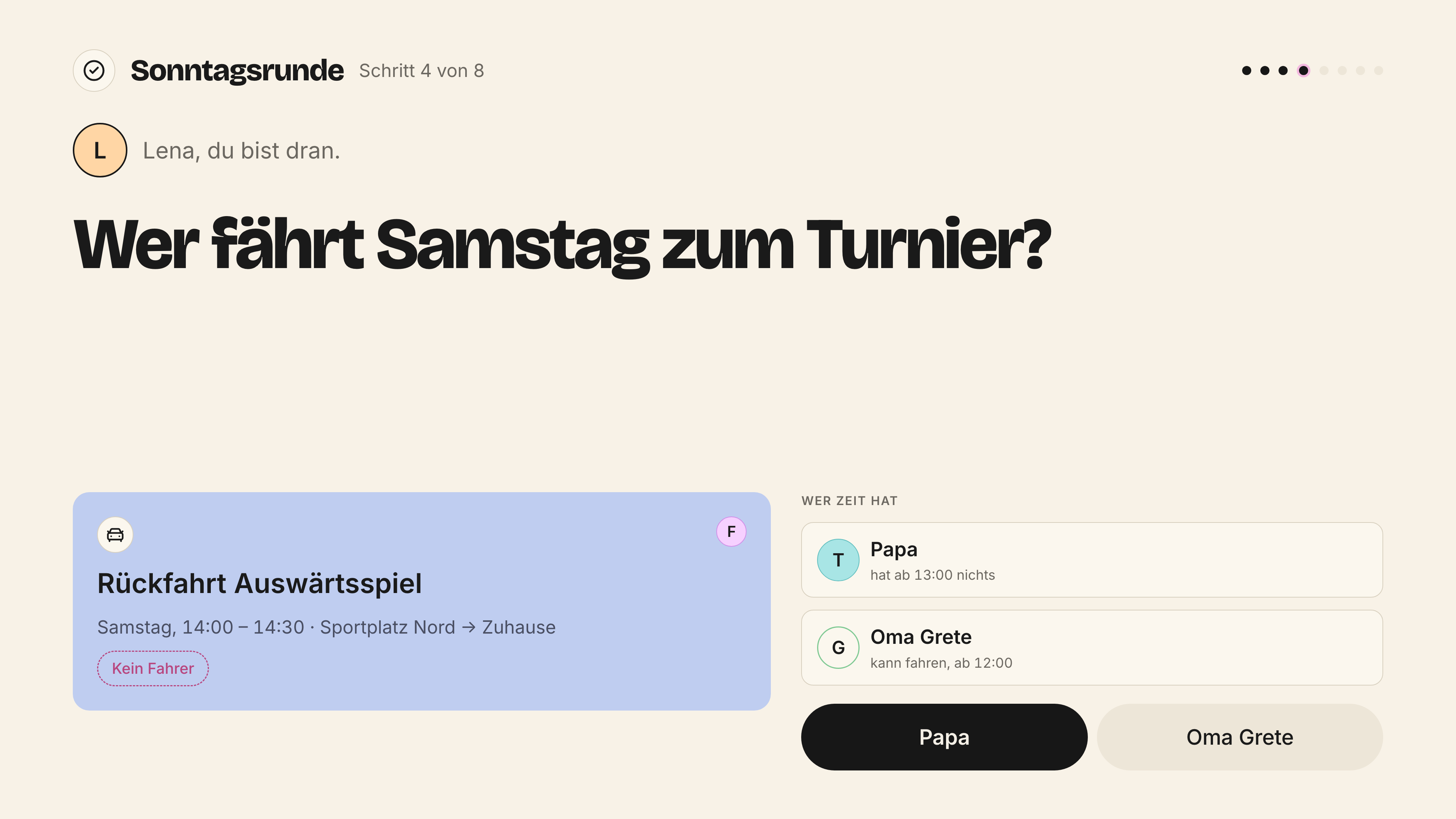
*Sonntagsrunde · breitbild · 3840 × 2160 px*
## Keyboard
On the Mac everything works with the keyboard. Focus is always visible: a 2 pt ring in open-pink with a 2 pt offset, only on `:focus-visible`.
| Shortcut | What | Status |
|---|---|---|
| ⌘ N | new event | established (quick menu in the reference screen) |
| ⌘ K | command palette | established (`docs/12-roadmap.md`, phase 0) |
| ⌘ J | ask Albert | established (`docs/11-produkt.md`) |
| ⌘ 1 – 3 | lenses on Today: timeline, board, household | established (`docs/11-produkt.md` §5b) |
| ⌘ F | search in the header | proposal |
| Arrow keys | move a card in the grid, announced to screen readers | established as a requirement (`docs/11-produkt.md` §5b) |
| ⌘ Z | undo | proposal, follows the system |
| ⌘ \ | expand and collapse the sidebar | proposal |
The shortcuts only appear in the quick menu on the Mac. Not on iPhone and iPad.
> **Open**
>
> `docs/11-produkt.md` describes Albert as an icon at the bottom right, 44 pt, with ⌘ J. The design system says Albert is not a place, and no reference screen shows the icon. Where the assistant surface sits is open.
## Roles on the Mac
| Role | Entry point |
|---|---|
| Anna, Tobias | week board, whole week, sidebar with everything |
| Child 13+ | own calendar, tasks – without safe, vault, finances |
| Children up to 12, guests, au pair | no entry point on the Mac (matrix III) |
## Every surface on the Mac
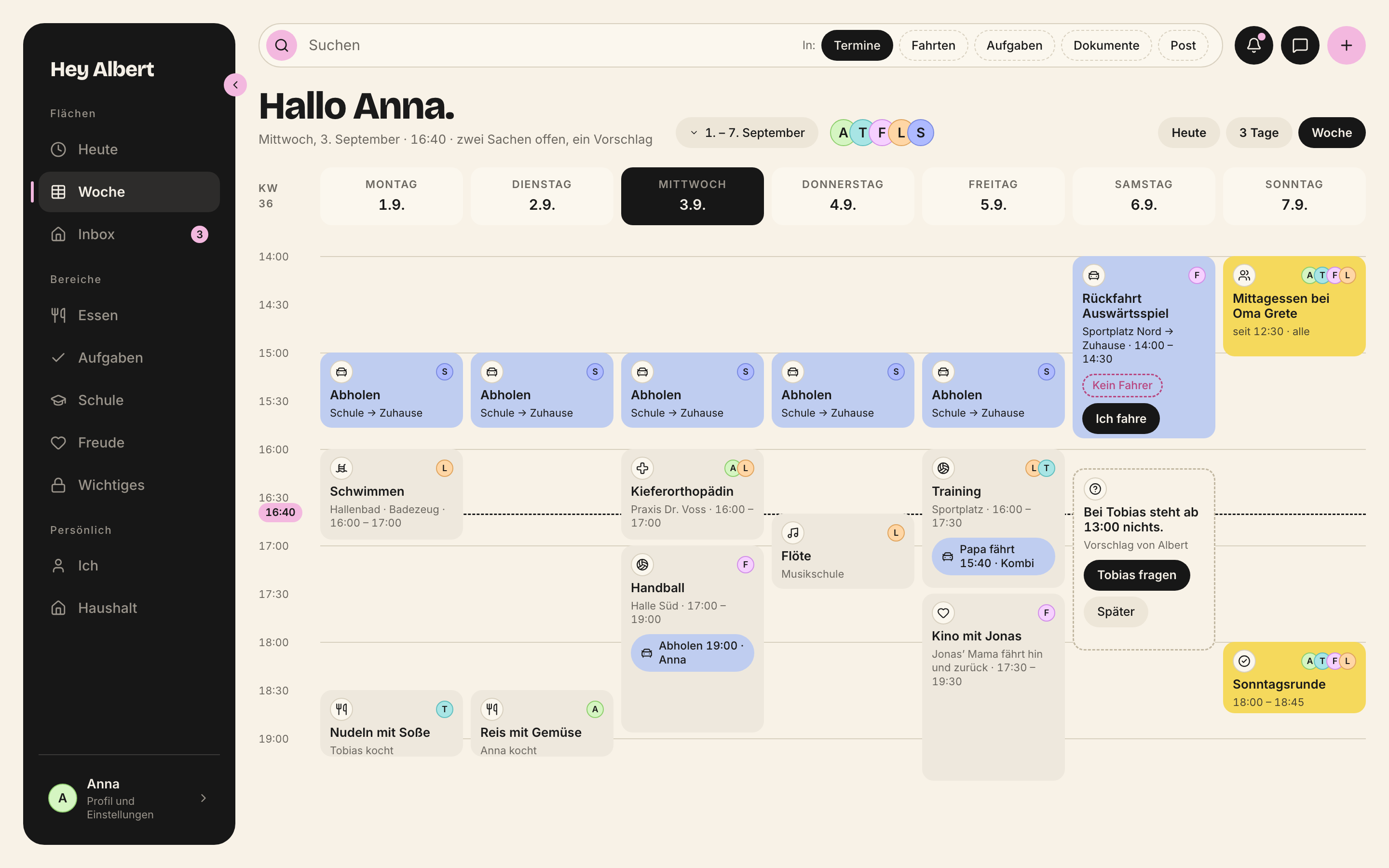
*Wochenboard · mac · 2880 × 1800 px*
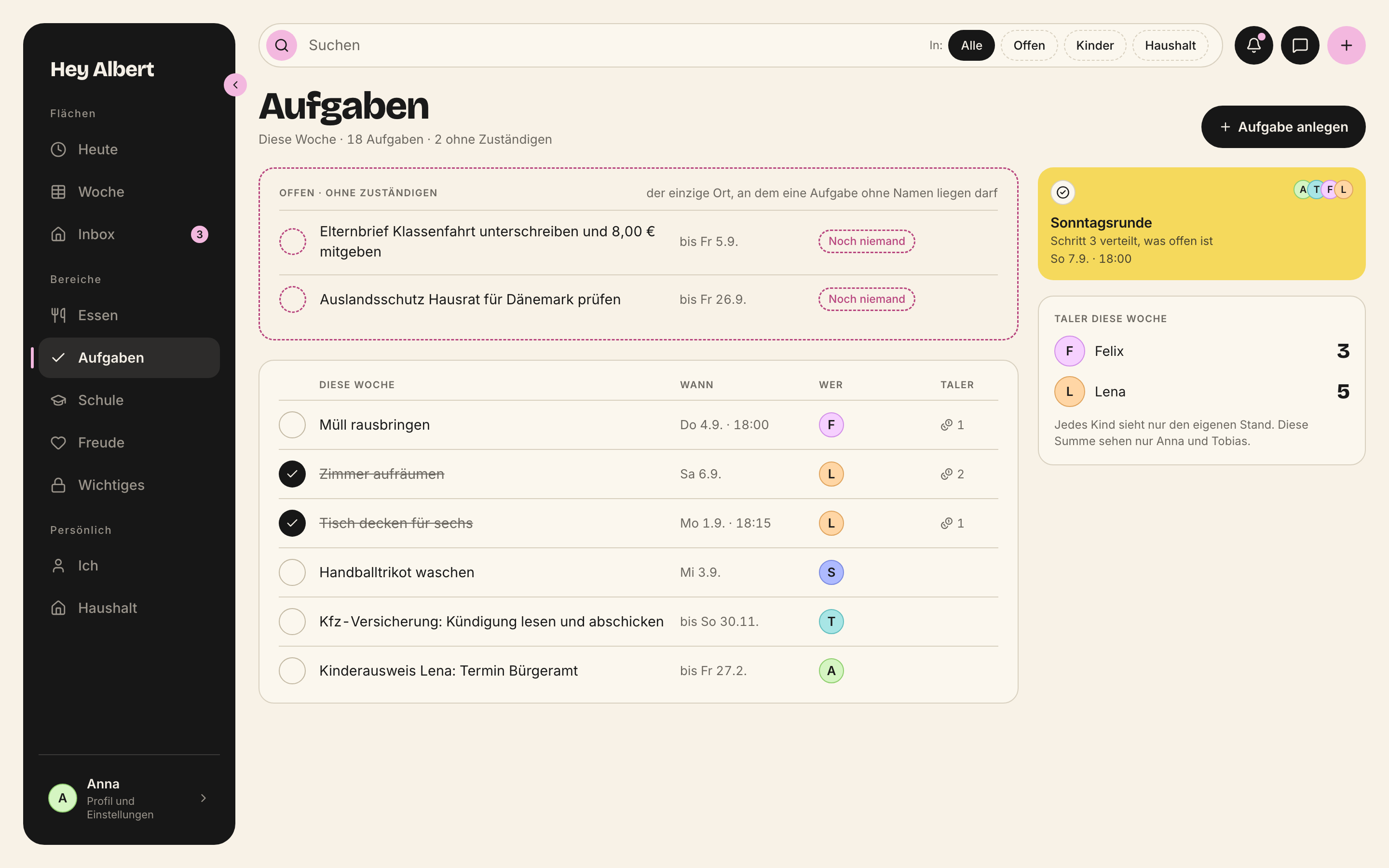
*Aufgaben · mac · 2880 × 1800 px*
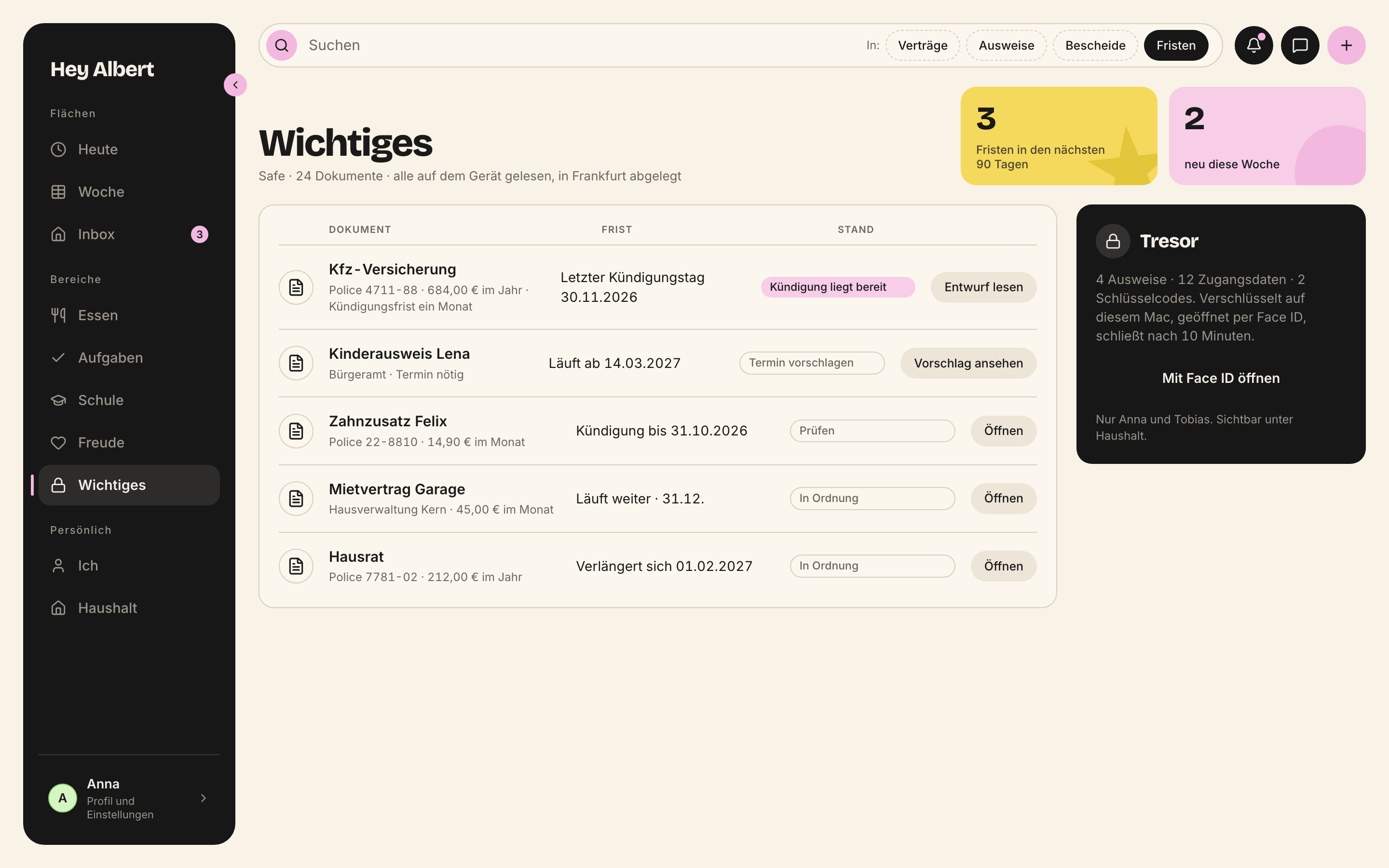
*Safe · mac · 2880 × 1800 px*
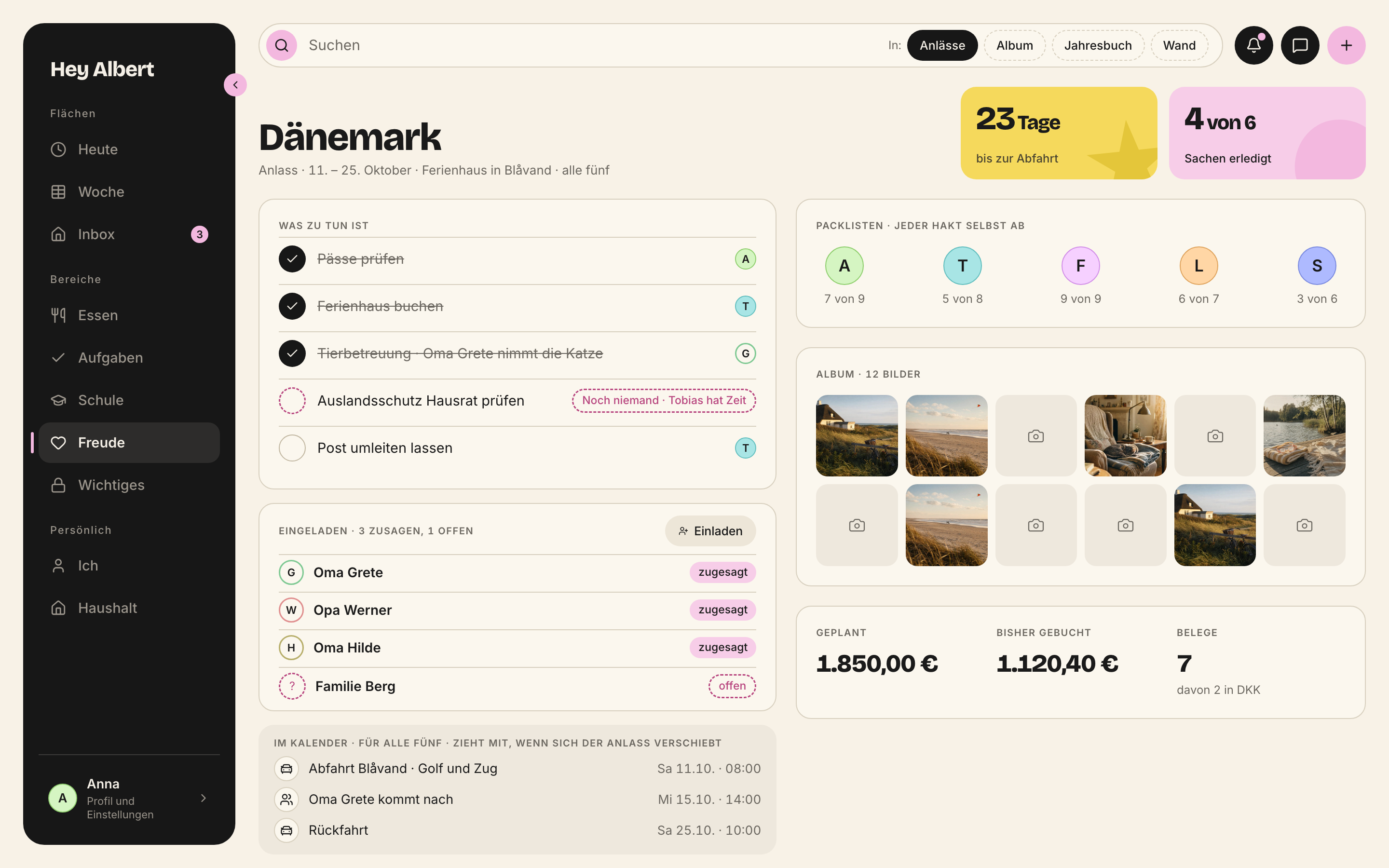
*Anlass · mac · 2880 × 1800 px*
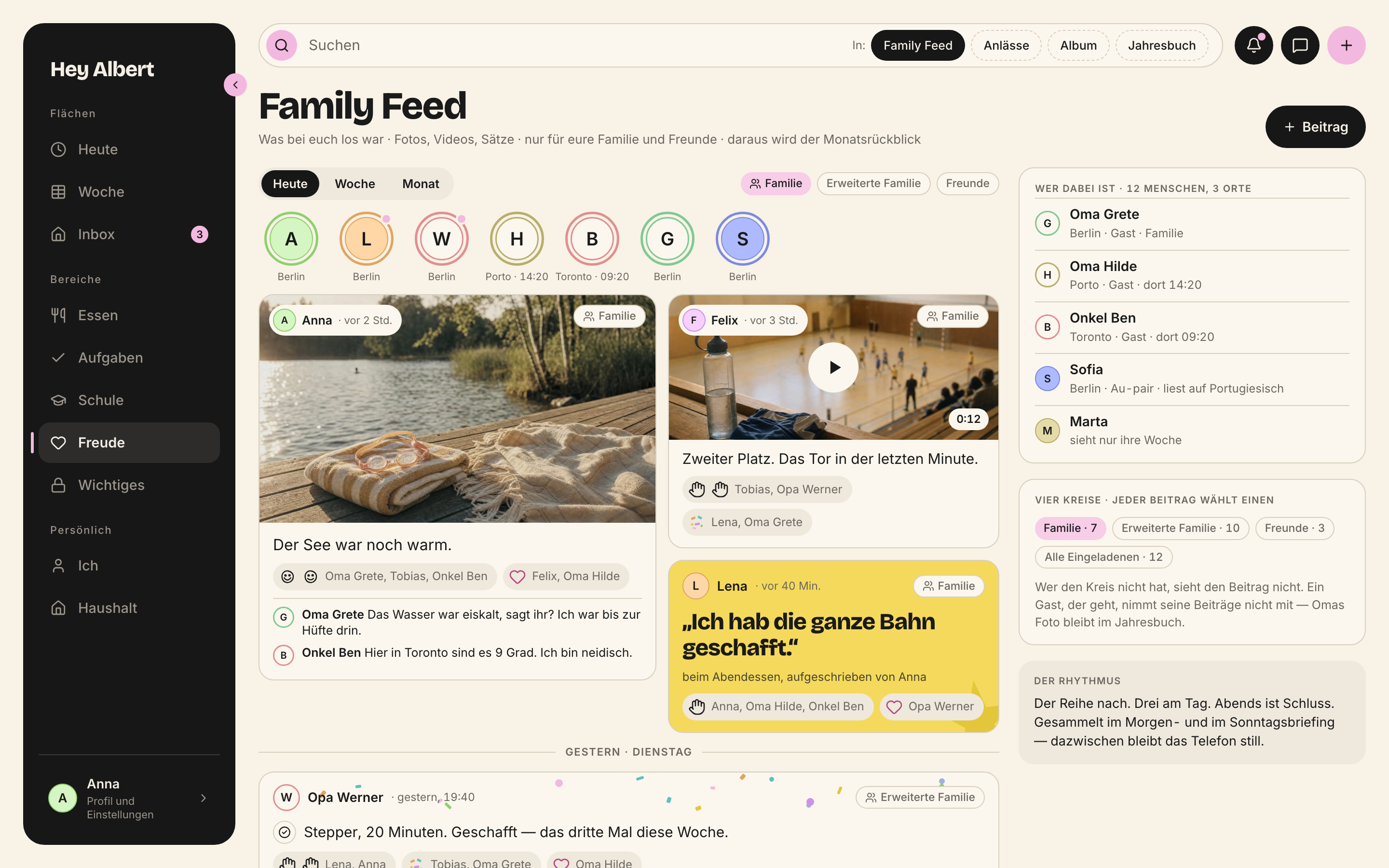
*FamilyFeedMac · mac · 2880 × 1800 px*
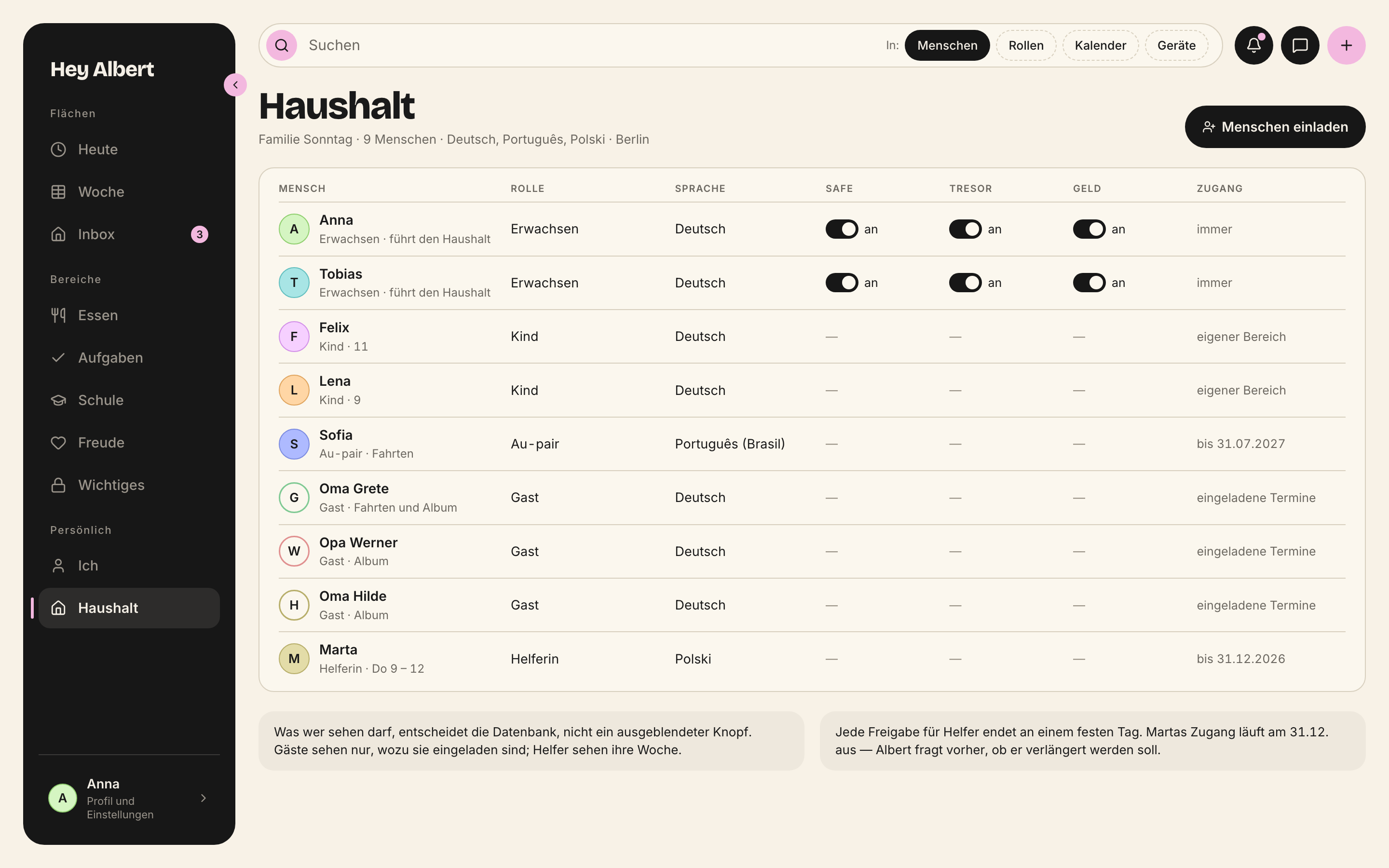
*Haushalt · mac · 2880 × 1800 px*
## What the Mac does not have
- Ticking off the take-along list, leaving and arriving, the shopping list in the store. That happens on the way, on the iPhone and the watch.
- Scanning letters and photographing a textbook page. That is what the iPhone camera is for.
- HealthKit, so movement and health. It does not exist on the Mac.
- Child spaces for children under 13.